Variables
A variable has a name, a type and a scope, which sets where it lives:
| Scope | Where it’s defined | Lifetime |
|---|---|---|
| Global | The Variables tab of the Narramancer window | One value for the whole game |
| Scene | A Narramancer Scene component | While that scene is loaded |
| Verb | A verb’s own inputs and outputs | While that verb runs |
Every variable is saved with the game. A variable has to be defined before the game runs, with a type and a unique name.
Creating global variables
Section titled “Creating global variables”Open the Narramancer window, switch to the Variables tab, and add variables to the list.
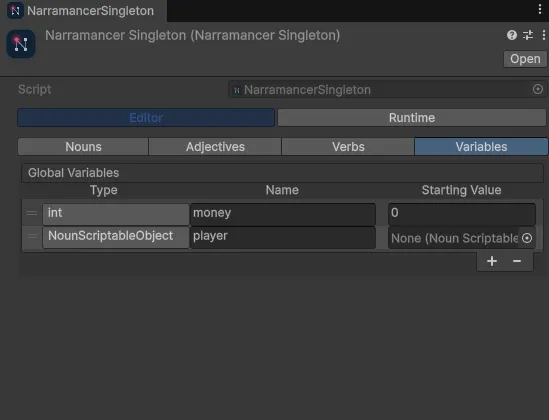
The third column is the starting value, for the types that support one. The variable takes this value when the game starts.
Reading and writing
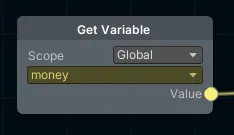
Section titled “Reading and writing”Read a variable with a Get Variable node and write one with a Set Variable node. Set the node’s scope to match the variable.
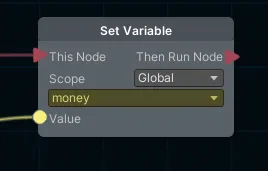
Set Variable only works inside an ActionVerb, and only changes the value when it runs.
Scene objects as values
Section titled “Scene objects as values”Global variables can have a starting value in the Narramancer window, but that window can’t point at objects in a scene. To give a verb a scene object, use one of these three:
- A Set Global Variables component, which assigns global variables when the scene starts.
- A Narramancer Scene component, with the object assigned to one of its scene variables.
- A Run Action Verb component, with the object assigned to one of the verb’s inputs.
All three are under GameObject → Narramancer. After changing a verb’s inputs or the global variables, press Update Assignments on a Run Action Verb or Set Global Variables component to sync it. Values assigned to a renamed input or variable are kept, as long as its type is unchanged.
Blackboards
Section titled “Blackboards”Under the hood, each running verb and each noun instance also has a blackboard: a set of values stored by string key. The Get Blackboard Variable and Set Blackboard Variable nodes read and write them directly. Most games never need to. Variables and flags cover the same ground without string keys.
Narramancer is source-available. It's free for noncommercial use underPolyForm Noncommercial 1.0.0, and commercial use needs an Asset Store license.Source on GitHub.