Saving and Loading
Most of a save happens on its own. The one thing you decide is which scene objects are saved, and that is set
on one component, Saveable.
The story · saved automatically
- Every noun instance, with its properties, stats and relationships
- Every variable
- Every running verb, including exactly what it is waiting on: a click, a choice, a timer
- The text and choices on screen
Scene objects · saved where you add a Saveable
- Position, rotation and scale
- Images, sprites, text and audio
- Whether the object is active
- Fields of your own scripts marked
[Save]
Adding save and load to your game
Section titled “Adding save and load to your game”The quickest way is the Overlay Buttons Manager Canvas prefab from the samples: Save and Load buttons, save slots with thumbnails, and a history log.
From your own code, a save and a load look like this:
// Savevar story = NarramancerSingleton.Instance.PrepareStoryForSave();SaveLoadUtilities.WriteSaveData("slot1", SaveLoadUtilities.SerializeData(story));
// Load: reopens the scene the save was made in, then restores the story into itvar save = SaveLoadUtilities.ReadSaveWrapper("slot1");NarramancerSingleton.Instance.LoadStory(save);
Where save files go
Section titled “Where save files go”Saves are JSON files.
| Where | Location |
|---|---|
| In the editor | Assets/Saves, so you can open and read them |
| In a build | Application.persistentDataPath/Saves |
| WebGL | Stored in the browser (IndexedDB). They survive a page reload. |
Saving scene objects: the Saveable component
Section titled “Saving scene objects: the Saveable component”Add one Saveable to each GameObject whose state should come back after a load. It does two things:
- It gives the object a permanent id. Saves point at objects by this id, not by name or place in the hierarchy. You can rename, reparent or reorder an object without breaking existing saves.
- It saves what you tick. The inspector lists Active state, plus a toggle for each component on the object that Narramancer knows how to save:
| Component | What comes back after a load |
|---|---|
| Transform | Local position, rotation and scale |
| Rect Transform | Anchored position, size, rotation and scale |
| Image, Sprite Renderer | Sprite, color and whether it is enabled |
| Text | The text, its color and whether it is enabled |
| Audio Source | Clip, playback position, volume, pitch, looping and whether it was playing |
| Animation | Clip, time, speed and wrap mode |
| Nav Mesh Agent | Destination, speed, stopping distance and whether it is stopped |
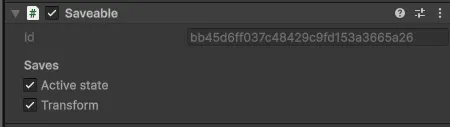
Adding a Saveable by hand ticks everything it finds. Untick what should reset to the scene’s own state on a
load. A Saveable with nothing ticked is identity only: other saves can point at the object, but nothing
about the object itself is saved.
Adding Saveables in bulk
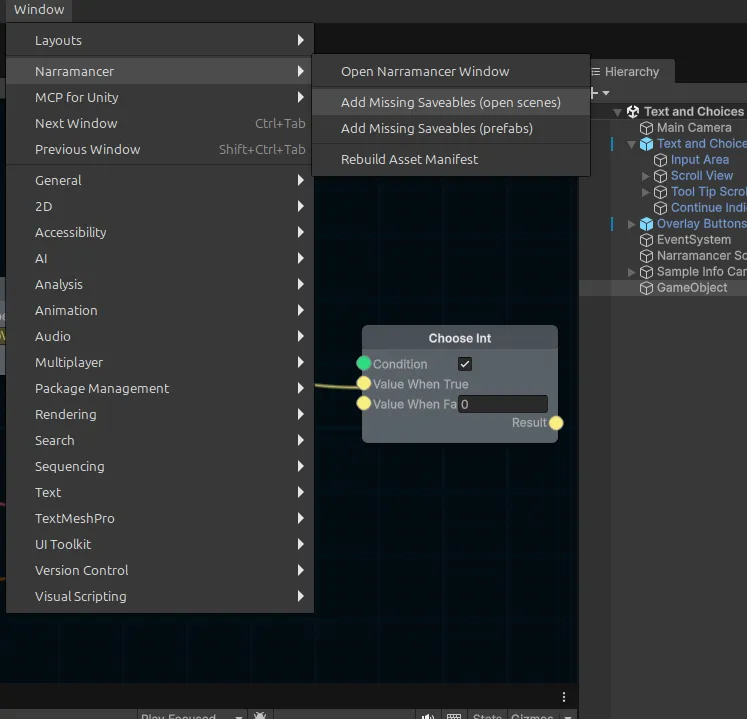
Section titled “Adding Saveables in bulk”Run Window → Narramancer → Add Missing Saveables (open scenes, or prefabs). It finds objects that need an id because something points at them, and adds identity-only Saveables. Tick what you want saved afterwards.
Your own scripts
Section titled “Your own scripts”Mark a field [Save] on any MonoBehaviour that sits on an object with a Saveable, and it is saved and
restored with the object. No other code is needed. The inspector lists these scripts under Also saved, by
their [Save] fields.
public class Lantern : MonoBehaviour { [Save] private float oilLeft = 1f; [Save] private bool lit; [Save] private List<string> litBy = new List<string>();}Fields can hold numbers, strings, Unity value types like Vector3 and Color, lists, dictionaries, your own
[Serializable] classes, assets, and scene objects that have a Saveable.
Movement and animation
Section titled “Movement and animation”The Translate GameObject, Tween GameObject Rotation, Play Animation and Move NavMesh Agent nodes keep going after a load: a character saved halfway through a walk finishes the walk, and a verb waiting for it to arrive carries on when it does.
The moving object needs a Saveable. If it doesn’t have one, Narramancer logs a warning when the move starts.
Assets in a save
Section titled “Assets in a save”When a save points at an asset, such as the sprite on an image or a noun in a variable, it records a permanent id. In a build, those ids are looked up in an asset manifest that Narramancer rebuilds before every build. The manifest includes:
- every Narramancer asset (nouns, adjectives, verbs and their nodes),
- every asset those reference, such as the sprites in your nouns,
- everything in a
Resourcesfolder.
That covers almost everything. The exception is an asset that only your own code or the scene refers to. Add
those to the manifest’s Additional Assets list (Assets/Resources/NarramancerAssetManifest). You can
rebuild the manifest by hand from Window → Narramancer → Rebuild Asset Manifest.
If a save meets an asset it can’t name, it logs a warning saying which one, and that one item comes back as the scene has it.
Nouns and GameObjects
Section titled “Nouns and GameObjects”If a noun instance is tied to a GameObject, add a SerializeNounInstanceReference
to that GameObject so the link survives a load. GameObjects created by a
SerializableSpawner are saved and recreated on load automatically.
Narramancer is source-available. It's free for noncommercial use underPolyForm Noncommercial 1.0.0, and commercial use needs an Asset Store license.Source on GitHub.