Narramancer Window
The Narramancer window is the hub for your game’s starting nouns, verbs and global variables. It is really the
inspector of the Narramancer settings asset in Assets/Resources, so everything in it is saved with your
project.
Opening the window
Section titled “Opening the window”Open it from Window → Narramancer. It docks like any other panel, next to the Inspector or the Project window.
The Window → Narramancer menu also has Add Missing Saveables (for open scenes, or for prefabs) and Rebuild Asset Manifest. See Saving and Loading.
The Editor and Runtime buttons at the top switch between its two views.
Editor view
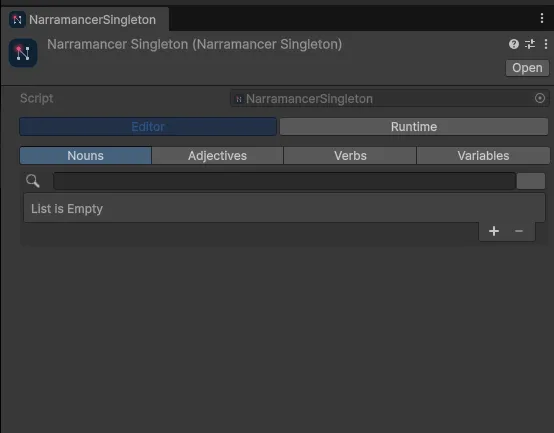
Section titled “Editor view”The Editor view sets up the game before it runs, in four tabs: Nouns, Adjectives, Verbs and Variables.
| Tab | What it holds |
|---|---|
| Nouns | The nouns created when the game starts. The plus button offers Create new asset… (make a noun asset and add it here in one step) or Add Existing… |
| Adjectives | The properties, stats and relationships in your game. Create new Adjective… makes one; Add all used adds every adjective your nouns already use. |
| Verbs | ActionVerbs that run as soon as the game starts, right after the nouns are created. Drag a verb asset into the list, or use the plus button and Add Existing… |
| Variables | Global variables, with their types and starting values. See Variables. |
Runtime view
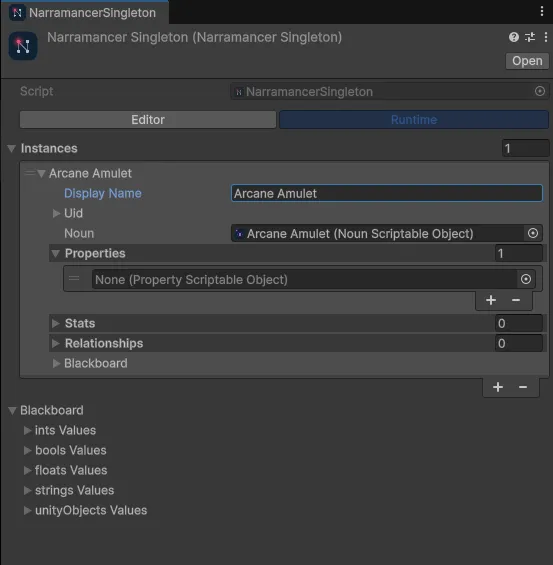
Section titled “Runtime view”In Play Mode, switch to Runtime to see the live table of noun instances and the global blackboard. You can inspect any instance, and add or remove properties and stats while the game runs. That’s handy for testing a branch without playing up to it.
From code
Section titled “From code”Everything the window shows is also available from scripts through one entry point:
var narramancer = NarramancerSingleton.Instance; // exists once the game startsFrom there you can find and create noun instances, read and write variables, and save and load.
Narramancer is source-available. It's free for noncommercial use underPolyForm Noncommercial 1.0.0, and commercial use needs an Asset Store license.Source on GitHub.